
Call us now :08045812101
 Send Inquiry
 Send Inquiry
Inkjet Inktank And Laser Printer
MOQ : 1 Piece
Inkjet Inktank And Laser Printer Specification
- Memory Size
- 256 MB
- Display Type
- LCD
- Power Consumption
- Maximum 20W
- Connectivity Type
- Wi-Fi, USB, Ethernet
- Production Output
- High Volume
- Paper Size
- A4, Letter, Legal
- Features
- Duplex Printing, Borderless Printing, Mobile Printing Support
- Processor Speed
- 600 MHz
- Install Type
- Direct/Network
- Noise Level
- <54 dB
- Accessory Name
- Power Cable, USB Cable, Installation CD
- Print Technology
- Inkjet Inktank / Laser
- Function Type
- Print, Scan, Copy
- Usage & Applications
- Office, Home, School Printing
- Scanning Resolution
- 1200 x 1200 dpi
- Dimension (L*W*H)
- 470 x 380 x 200 mm
- Scan Speed
- Up to 8 ipm
- Type
- Inkjet Inktank & Laser Printer
- Interface Type
- USB, Wireless, Ethernet
- Color Depth
- 24-bit
- Scan Type
- Flatbed, Sheetfed
- Print Speed
- Up to 35 ppm
- Max Paper Size
- A4
- Size
- Standard Desktop
- Weight
- 6.5 kg
- Compatible Operating System
- Windows, macOS, Linux
- Automatic Document Feeder (ADF)
- Available
- Cartridge Type
- Refillable Ink Tank / Toner Cartridge
- First Page Out Time
- Approx. 7 seconds
- Sleep Mode Power
- <1 W
- Printing Resolution
- Up to 4800 x 1200 dpi
- Energy Star Certified
- Yes
- Monthly Duty Cycle
- 12000 pages
- Input Voltage
- AC 100-240V, 50/60Hz
- Supported Media Types
- Plain Paper, Glossy Photo Paper, Envelopes
- Output Capacity
- 50 sheets
- Mobile Print Support
- Apple AirPrint, Google Cloud Print
- Paper Tray Capacity
- 150 sheets
- Operating Humidity Range
- 20% - 80% RH
- Operating Temperature Range
- 5°C to 35°C
Inkjet Inktank And Laser Printer Trade Information
- Minimum Order Quantity
- 1 Piece
- Supply Ability
- 1 Piece Per Day
- Delivery Time
- 1 Days
Inkjet Inktank And Laser Printer About
Inkjet Ink Tank and Laser Printer refers to a combination of printing technologies that offer efficient and high-quality printing solutions for both home and office use. Inkjet ink tanks are designed for inkjet printers, while laser printers utilize toner cartridges. These printing systems provide reliable and cost-effective options for producing professional documents, vivid images, and vibrant color prints.
FAQs (Frequently Asked Questions):
Q: What is the difference between an inkjet printer and a laser printer?
A: Inkjet printers use liquid ink sprayed onto the paper through microscopic nozzles, while laser printers use toner, a dry powdered substance that is fused onto the paper using heat and pressure. Inkjet printers are ideal for producing high-quality color prints and photographs, while laser printers excel at fast and precise black and white printing.
Q: What are the advantages of using an inkjet ink tank system?
A: Inkjet ink tank systems offer several benefits. They have a larger ink capacity compared to traditional ink cartridges, reducing the frequency of replacing cartridges. This leads to cost savings and convenience. Ink tank systems also provide better print quality, higher page yields, and the ability to refill the ink tanks individually, resulting in reduced waste.
Q: Are inkjet ink tank systems suitable for high-volume printing?
A: Inkjet ink tank systems are designed to handle various printing volumes. While they may not be as fast as laser printers, they can still efficiently handle moderate to high printing volumes. Inkjet printers with ink tank systems are often preferred for home and small office environments that require versatile and high-quality printing.
Q: What are the advantages of laser printers?
A: Laser printers offer fast and precise printing, making them ideal for high-volume black and white printing. They are known for their sharp text and graphics, suitable for professional documents and business applications. Laser printers are also more durable and require less maintenance compared to inkjet printers.
Outstanding Performance and Flexibility
Handle large print jobs efficiently with a monthly duty cycle of 12,000 pages and fast output up to 35 pages per minute. The device's automatic document feeder and duplex printing streamline multi-page tasks, making it ideal for productivity environments.
Exceptional Compatibility and Connectivity
Connect with ease through Wi-Fi, USB, or Ethernet on Windows, macOS, or Linux systems. Mobile print support via Apple AirPrint and Google Cloud Print lets you print directly from smartphones and tablets-perfect for modern, on-the-go workflows.
Professional-Quality Output
Impress with sharp text and vivid images, thanks to up to 4800 x 1200 dpi print resolution and 24-bit color depth. The printer accommodates various media types, from plain paper to glossy photo paper and envelopes, giving flexibility for diverse printing needs.
FAQ's of Inkjet Inktank And Laser Printer:
Q: How do I set up the printer for the first time?
A: To begin, unpack the printer and install the provided power and USB cables. Use the Installation CD or download the latest drivers from the manufacturer's website. Follow the on-screen instructions on your Windows, macOS, or Linux device to complete setup. For wireless installation, connect to your Wi-Fi network using the printer's LCD display.Q: What media types and sizes does this printer support?
A: This printer accommodates A4, Letter, and Legal size papers, as well as envelopes and glossy photo paper. The paper tray holds up to 150 sheets, while the output tray manages 50 sheets, ideal for high-volume or varied print jobs.Q: When should I refill the ink tank or replace the toner cartridge?
A: Monitor ink or toner levels from the printer's display panel or via the companion software. Refillable ink tanks and toner cartridges are designed for high output; typically, refill or replace them when print quality declines or when prompted by the display.Q: Where can I use mobile printing features like AirPrint or Google Cloud Print?
A: You can use AirPrint or Google Cloud Print from anywhere within the same network as the printer, or remotely if set up accordingly. This allows you to print documents and photos directly from your mobile devices without needing a wired connection.Q: What process does the automatic document feeder (ADF) use for scanning or copying multiple pages?
A: The ADF allows you to load multiple sheets, which are automatically fed through the scanner for batch scanning or copying. This process saves time and is particularly beneficial for multi-page documents.Q: How does this printer benefit energy-conscious users?
A: Certified by Energy Star, this printer consumes less than 1W in sleep mode and a maximum of 20W during operation, helping reduce energy costs and environmental footprint without compromising productivity.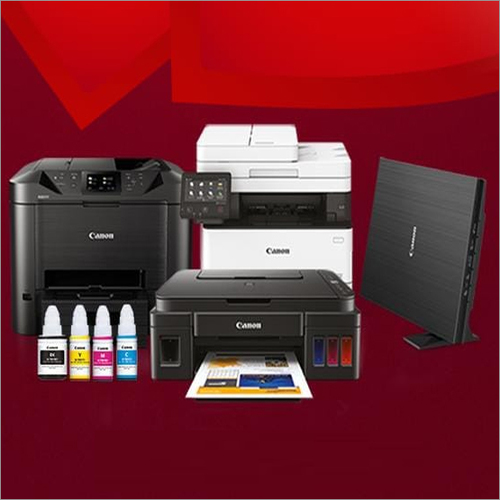
Tell us about your requirement

Price:
Quantity
Select Unit
- 50
- 100
- 200
- 250
- 500
- 1000+
Additional detail
Mobile number
Email


 Send Inquiry
Our Products


22/24, Gami House, Modi Street, Opp. GPO, Fort, Mumbai - 400001, Maharashtra, India

Mr Dinesh M Gami
(Director)
Mobile :08045812101
 Send Inquiry
 Send SMS
Developed and Managed by Infocom Network Private Limited.


